If you’ve spent hours tinkering with Google Sheets, you’ve probably encountered the frustration of wanting to remove the header from an array, only to discover that there’s no built-in formula for that. How frustrating! But luckily, Google Sheet lets us create our own formulas. There’re two ways to do so. The first one is through Named Functions, in which you can create a new formula using a combination of built-in formulas in a sidebar. Simply navigate to the menu Data > Named functions. (See my blog post on a weight-average formula for an example.) The other way is to use Google AppScript. You can find the documentation here.
Inspired by All Stacks Developer‘s post, I’d like to introduce a few JavaScript array operations into Google Sheet so you can manipulate arrays like a pro with just a simple formula. Below are the script that you can copy and paste into the Google AppScript editor. If you’re new to using AppScript, follow these steps to set up your first custom formula:
- Step 1: Open your Google Sheets document. (Fun fact: The sheets.new URL directly takes you to a new sheet, automatically saved to your Google Drive.)
- Step 2: Click on “Extensions” in the menu at the top, and then select “Apps Script.”
- Step 3: In the Apps Script editor, paste the code provided below
- Step 4: Save the script. Go back to the sheet and test out the formula.
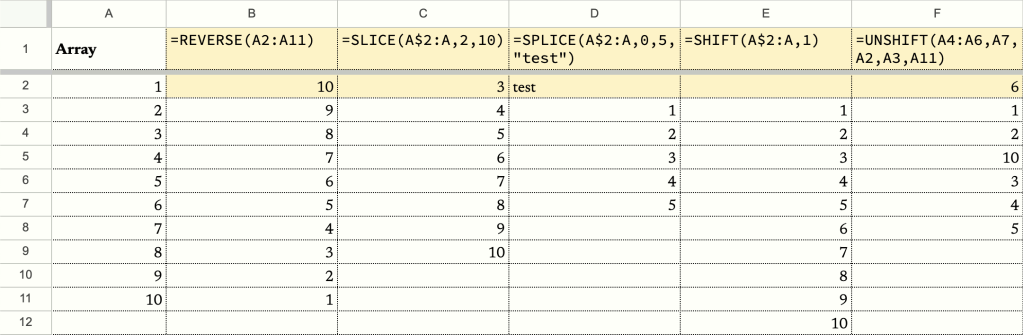
REVERSE
/**
 * Reverses the order of elements in an array.
 *
 * @param {array} array The array to reverse.
 * @return The reversed array.
 * @customfunction
 */

function REVERSE(array) {
  console.log(array);

  // Use the reverse method to reverse the order of elements in the array
  return array.reverse();
}
SLICE
/**
 * Slices an array and returns a new array containing the selected elements.
 *
 * @param {array} array The array to slice.
 * @param {number} start The starting index of the slice (inclusive). If negative, it represents an offset from the end of the array.
 * @param {number} end The ending index of the slice (exclusive). If negative, it represents an offset from the end of the array.
 * @return The sliced array.
 * @customfunction
 */

function SLICE(array, start, end) {
  console.log(array);

  // Use the slice method to extract the desired portion of the array
  return array.slice(start, end);
}
SPLICE
/**
 * Modifies an array by removing or replacing existing elements and optionally adding new elements.
 *
 * @param {array} array The original array to modify.
 * @param {number} start The index at which to start modifying the array.
 * @param {number} keepCount The number of elements to keep in the array.
 * @param {...any} items Any number of elements to add to the array.
 * @return The modified array.
 * @customfunction
 */

function SPLICE(array, start, keepCount, ...items) {
  console.log(array);

  // Create a copy of the array to avoid modifying the original array
  let modifiedArray = array.slice();

  // Remove the elements after the specified keepCount
  modifiedArray.splice(start + keepCount);

  // Add the new elements at the specified index
  modifiedArray.splice(start, 0, ...items);

  return modifiedArray;
}
SHIFT
/**
 * Shifts the elements of an array by a specified number of positions.
 *
 * @param {array} array The array to shift.
 * @param {number} positions The number of positions to shift the elements. Positive values shift to the right, negative values shift to the left.
 * @return The shifted array.
 * @customfunction
 */

function SHIFT(array, positions) {
  console.log(array);

  if (positions > 0) {
    for (let i = 0; i < positions; i++) {
      array.unshift(array.pop());
    }
  } else if (positions < 0) {
    for (let i = 0; i < Math.abs(positions); i++) {
      array.push(array.shift());
    }
  }

  return array;
}
UNSHIFT
/**
 * Adds one or more elements to the beginning of an array and returns the new length of the array.
 *
 * @param {array} array The array to modify by adding elements.
 * @param {...any} elements The elements to add to the beginning of the array.
 * @return The modified array after adding elements.
 * @customfunction
 */

function UNSHIFT(array, ...elements) {
  // Iterate through the elements in reverse order and use the unshift method to add them to the beginning of the array
  for (let i = elements.length - 1; i >= 0; i--) {
    array.unshift(elements[i]);
  }

  return array;
}
Hope you find this useful. If you have any questions or feedback, please leave a comment below.
Until next time,
Joshua
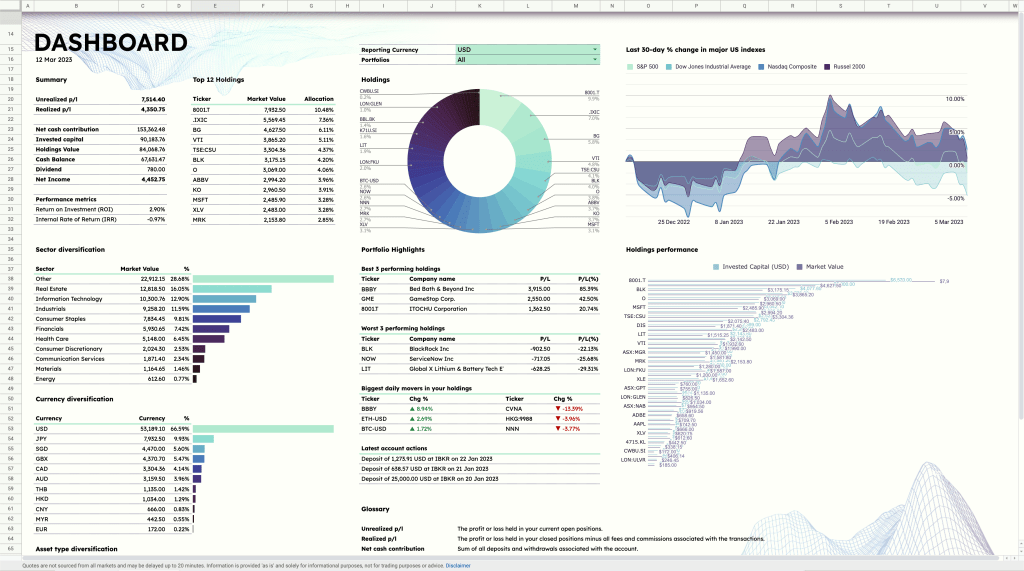
I hope you enjoy this tutorial as much as I enjoy writing it. If you’re into organizing your life, be sure to check out the ZestFi Stock Portfolio Tracker. Not your typical Google Sheet template, the ZestFi Stock Portfolio Tracker lets you easily track all your stocks even if you have multiple accounts, own different types of assets, and hold multiple currencies! This tracker makes use of the GOOGLEFINANCE API to fetch stock price updates and provides powerful analytics presented in a ultra clean dashboard, helping you make the best investment decisions. Say goodbye to the hassle of going back and forth between different apps and website to manage your investments, and say hello to ZestFi!
 ZestFi