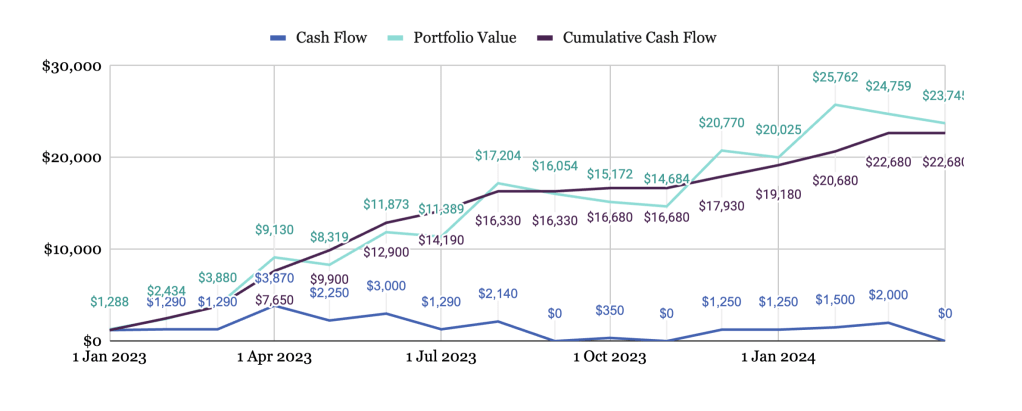
When it comes to evaluating the performance of your investments, two critical metrics that can help you make informed decisions are Internal Rate of Return (IRR) and Extended Internal Rate of Return (XIRR). These metrics provide insights into the profitability and efficiency of your investments over time, considering cash flows at different periods. In this article, I’ll show you how to calculate IRR and XIRR for an investment using Google Sheets™.
What is IRR?
Internal Rate of Return (IRR) is a financial metric that calculates the annualized rate of return for an investment, indicating the discount rate at which the net present value (NPV) of all future cash flows becomes zero. In simpler terms, it helps you determine the annual percentage return you can expect from an investment.
If you need a refresher on the basics of IRR, we’ve got you covered in this comprehensive article.
What is XIRR?
Extended Internal Rate of Return (XIRR) is an enhanced version of IRR, specifically designed to handle irregular cash flows. XIRR considers not only the timing of cash flows but also the actual dates, making it suitable for investments with non-periodic contributions or withdrawals.
Calculating IRR in Google Sheets
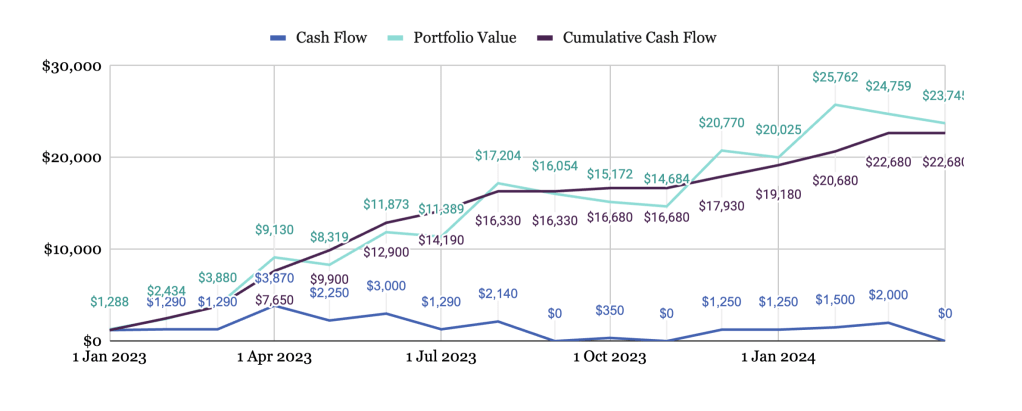
Let’s say you have a series of cash flows related to an investment portfolio, which looks a little bit like the example below. Here is what each column contains:
- Column A: Date series
- Column B: The cash flow (deposits) made during each period
- Column C: The value of the portfolio at the end of each period
- Column D: The Cumulative Cash Flow. A running total of the cash flow over time.
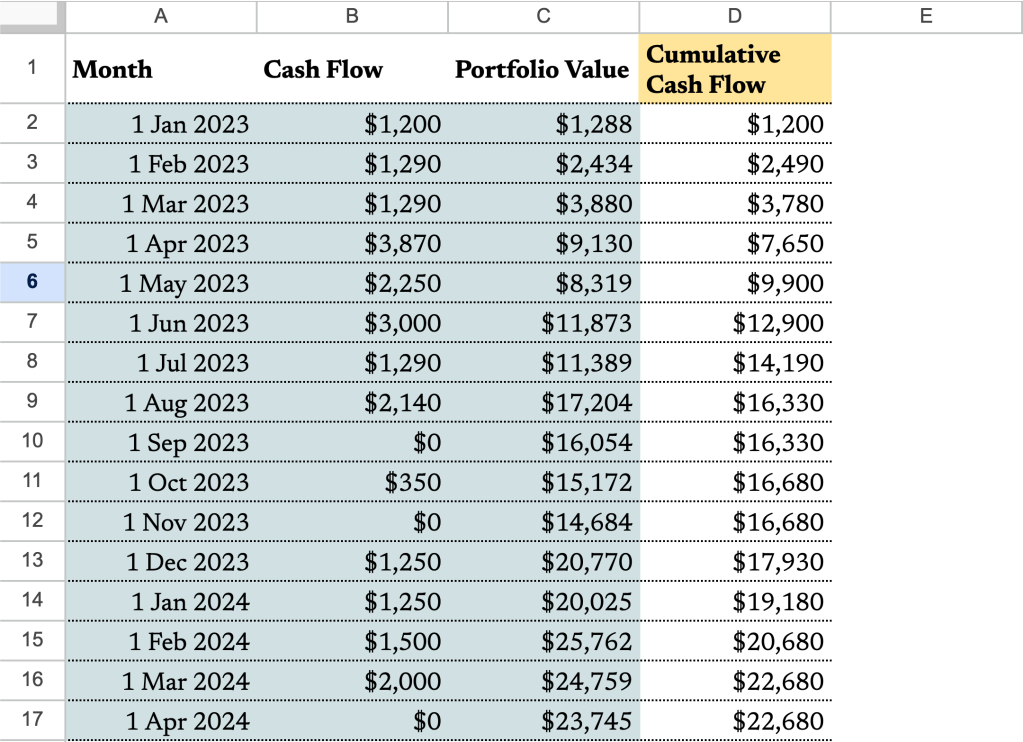
For IRR calculations, you technically don’t need columns A and D. However, keep them close; they’ll be important when we delve into XIRR. But first, let’s understand the syntax of the IRR formula:
IRR(cashflow_amounts, [rate_guess])Where:
cashflow_amounts– An array or range containing the income or payments associated with the investment. It must contain at least one negative and one positive cash flow to calculate rate of return.rate_guess– [ OPTIONAL – 0.1 by default ] – An estimate for what the internal rate of return will be.
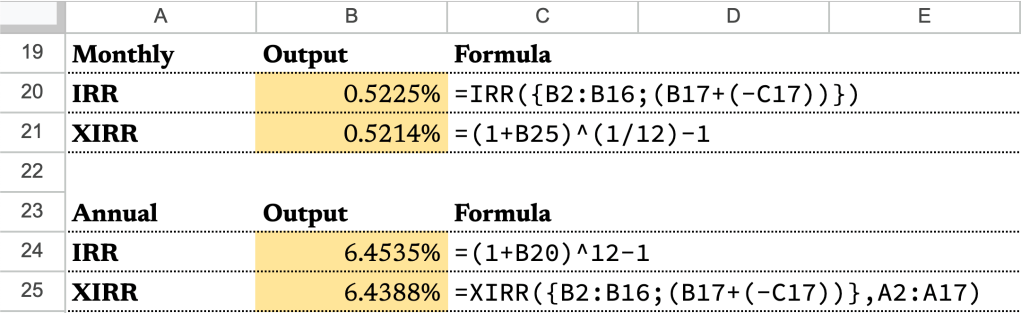
We’ll use this formula to calculate the IRR. In cell B20, type in:
=IRR({B2:B16;(B17+(-C17))})B2:B16represents the cashflows from January 1, 2023, to March 1, 2024.(B17+(-C17))represents the net cashflow on Apr 1, 2024. It’s calculated by subtracting the Portfolio Value (C17) from the last cash flow event in the series (B17) . The Portfolio Value (C17) is the amount you have in your investment at the end of that period.- Using curly brackets “{}” and semicolon “;“, we create an array containing the cashflows from January 1, 2023 to Apr 1, 2024.
- The output of the formula should be 0.5225%.
Note that this is a monthly rate. To find out how much the IRR we need to annualize it with the following formula:
=(1+B20)^12-1The expected output is 6.4535%.
Calculating XIRR in Google Sheets
With the same data as above, let’s calculate the XIRR. The syntax of the XIRR formula is as follows:
XIRR(cashflow_amounts, cashflow_dates, [rate_guess])Where:
cashflow_amounts– An array or range containing the income or payments associated with the investment. It must contain at least one negative and one positive cash flow to calculate rate of return.cashflow_dates– An array or range with dates corresponding to the cash flows incashflow_amounts.rate_guess– [ OPTIONAL – 0.1 by default ] – An estimate for what the internal rate of return will be.
We’ll use this formula to calculate the XIRR. In cell B25, type in:
=XIRR({B2:B16;(B17+(-C17))},A2:A17)The expected output is 6.4388%. Notice that it’s slightly different from the annnualized IRR because of different assumptions about compounding.
Now, for the sake of comparison, let’s find out the monthly XIRR using this formula:
=(1+B25)^(1/12)-1The expected output is 0.5214%, whereas the monthly IRR is 0.5225%. Again, slight difference. But either result should give you a pretty good estimate of the performance of the portfolio over the time period.
In summary, IRR and XIRR are like your GPS and map for investments. IRR helps you figure out the annual return rate, while XIRR handles tricky cash flows. Now that you can calculate these with Google Sheets, you have the tools to understand your investments better and make smart money choices. So, go ahead confidently, as IRR and XIRR are here to help you on your financial journey.
Until next time,
 ZestFi